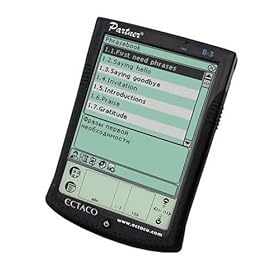
 After a prolonged delay, and eager anticipation the Franklin eBookman finally shipped today. Its not every day that a new device comes out that features all the usual organiser/PIM/PDA function but also an MP3 player, an eBook reader and an Audio Book player. First impressions are mixed. The box comes with the device, a flimsy plastic cover, a USB cable and thats all. No user manual or instruction guide. Instead, just a leaflet telling you to download the operating system from Franklin.com. That's right! - You have to download the OS and install it before you can use it. Took me about 1 hour (and I'm not computer illiterate!). Beware - all the basic information takes up almost 5MB of memory. Leaves only 11MB on the EBM911 and only 3.5MB on the EBM900!!
Finally...up and running! The screen is clear, backlight works well. The case is solid (surprisingly heavy). Touch screen is sensitive, and the handwriting recognition software is fairly accurate, even with no practice. A (on-screen) pop-up keyboard is provided if you prefer. The PC-link software is effortless. Simply drag files from the PC screen to the eBookman screen and the file is transfered instantly.
Now, a few bugs emerge. The Date Book funtion allows you to view your appointments in daily, weekly or monthly format. Unfortunately, when adding a recurring appointment in the daily view, it did not show up on the weekly view(!) Easy to miss a crucial meeting this way. Also, the To-Do list is not synchronised with the Date Book. So if you have added a task to do in the To Do folder, it will not show up on the relevent day in the Date book. Annoying.
The MP3 player is surprisingly good quality sound, even without earphones. But it played my test file too fast. I could not find any parameters to change the playback speed.
Still waiting to download an ebook for the eBook reader. The claim is a clear type, resizable fonts, read in landscape or portrait orientation, bookmarkable, searchable text.
Finally, the ugly. The stylus provided is a very cheap, plastic job that looks like it came out of a cereal box. It does not click firmly into the case, so easy to lose.
Overall, this machine has potential. Some bugs need ironing out. Luckily, with the PC synchronising software, this should be an easy job for Franklin, by just providing updates to their downloadable software. The open platform allows 3rd parties to produce custom software. Applications should abound in the near future.
I'm not 100% happy with it yet, but I'm going to keep my eBookman to see what the future holds.
Click Here to see more reviews about: Franklin EBM-900 eBookman (Translucent Blue)
Product Description:
The Franklin EBM-900 eBookman is an 8 MB multimedia and content playerin a pocketable format. With the eBookman, you can download and read or listento thousands of your favorite books. For reading comfort, the eBookman has alarge display that shows 87 percent more information than other handhelddevices. If you need to check a definition while reading a book, the eBookmancomes with an easily accessible Merriam-Webster dictionary. You can also listento music by downloading your favorite songs in MP3 format. The built-inmicrophone allows you to record messages that you can play back anytime, orwrite quick notes using either the built-in stylus or the pop-up keyboard. TheeBookman has a calendar, address book, to-do list, and scheduler so you canremain organized by carrying all of your important personal data with youwherever you go. The eBookman features state-of-the-art compression, highlysophisticated search, and easy-to-use hypertext.
The Franklin EBM-900 eBookman comes with a one-year warranty.
Buy Now

No comments:
Post a Comment