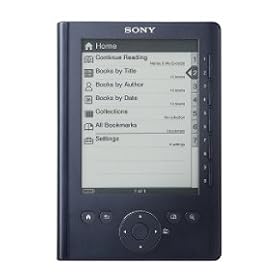
 I rarely, if ever, write reviews for products, simply because I rarely find a product that dramatically exceeds, or fails to meet, its published description. The PRS-300 "Pocket Edition" ereader is a device that provided a far better than expected experience.
 One device with which I was previously as impressed was the iPod Touch, which I've found to be simply one of the best consumer goods purchases that I've ever made. Funny enough, my principle use for the Touch was as an ebook reader, and it was the Touch's shortcomings as an ebook reader that eventually prompted me to purchase the Sony PRS-300 "Pocket Edition".
I read extensively, both on my work commute (1.5 hours each workday on public transit), and in the evenings and on weekends. Conservatively, I probably read upwards of 20 hours each week, both ebooks and downloaded news articles and the like. I previously purchased the Sony PRS-505, in late 2007, and found it to be a good ereader. The PRS-505 provided a sharp, glare-free page image that was easy and relaxing to read. Unfortunately, it was a bit delicate, and within a few weeks of purchasing I had managed to drop it (from only about 2.5 feet) and crush the upper corner, dislodging the power slider. After having it fixed under warranty, I held onto the PRS-505 until mid-2008, when I purchased an iPod Touch. I read on the Touch, and--briefly--on the Amazon Kindle 2, until I purchased the PRS-300.
The new PRS-300 "Pocket Edition" over-comes several of the short-comings of the Sony PRS-505 and Amazon Kindle 2:
1. Great form-factor: The PRS-300 really will fit in a pocket, either a jacket pocket or very comfortably in a pocket of my cargo shorts on the weekend. This is an improvement over the PRS-505, which always seemed either slightly too big (to fit in a jacket pocket, or anything short of backpack or my briefcase), or not quite large enough (to read work PDFs with charts and graphs, or more structured documents, like instruction manuals). The PRS-505 and the Kindle 2 were also awkward to tote by hand (which is why I dropped the PRS-505, while trying to get my mail). While the Pocket Edition won't display large, structured documents either, you recognize this as a trade-off for this model, in favor of its truly convenient size. It's perfect for books, news articles, blog posts and the like, and, not having to carry it by hand or in bag, I take it with me more often when I'm out, and use it more than either the PRS-505 or Kindle 2.
2. Excellent ergonomics: The PRS-300 simply feels great in the hand: it has excellent balance, and a really comforting heft that reminds me of the way a solid paperback book just rest in your hand without the need to consciously grasp it, or constantly adjust it. This is a true improvement over both the PRS-505 and the Kindle 2: Both of these devices were very, very light, which in consumer electronics is usually the Holy Grail of product design, but neither was particularly well-balanced and I was always conscious of having to exercise control of the device, especially when clicking the page-turn buttons. The Pocket Edition isn't by any means heavy--it's actually a lighter than both the PRS-505 and the Kindle 2, at about 7.5 ounces--but the smaller form-factor, coupled with its superb balance, allows you to comfortably fade into your reading, without the physicality of the device intruding. While that kind of device transparency was a stated goal of the Kindle, I have to admit that I only rarely was able to read with the Kindle 2 without it intruding in some way (usually to re-balance it in my hand). The Pocket Edition has only one page-turn button--the large round navigation pad in the bottom-center--but the pad is in comfortable reach of your thumb while holding the Reader on the side. The button is firm without being obtrusively difficult to press (which was often a failing I noticed on both the PRS-505 and the Kindle 2). Of all the things that I enjoy about the Pocket Edition, its truly comfortable, unobtrusive physical design is probably the stand-out quality.
3. More durable design: The PRS-300 is, like the iPhone, or iPod Touch, or your laptop, a piece of consumer electronics that you simply don't want to drop. Electronics are delicate (unless you spend ungodly amounts of money on Toughbooks and the like), and not tolerant of abuse. That said, the casing and design of the Pocket Edition is a very large step up from the PRS-505, which as I mentioned I managed to grievously injure with one (not very far) drop. I have "Whoops"-ed the Pocket Edition a couple of times, and was impressed that the more solid aluminum casing, coupled with the plastic end-caps and power slider, made it a great deal more resilient than its predecessor. In terms of durability, it's probably about comparable to the Kindle 2; the Kindle 2, though, at least from Amazon's marketing materials, does seem designed to "bounce back" from drops and falls that the Sony Reader was not made to withstand. In comparison with other ereaders on the market, the Pocket Edition is far sturdier, in terms of its heft, the resilient aluminum front buttons, and the (very) slightly elastic plastic end-caps.
4. Excellent screen image: The screen image of the Pocket Edition is crisp, clear, and CONSISTENTLY easy to read in both high- and medium-light conditions. The screen is non-glare, and there has been only one occasion (under somewhat harsh artificial light) when I needed to shift position slightly to remove a light-diffraction effect from the screen. The screen quality is comparable to the PRS-505, and considerably better than that of the Kindle 2. I'm somewhat puzzled by this, because there's only one e-ink technology on the market right now, and the manufacturers of the screens all license the same process, with the same quality control parameters (the parameters are part of the license agreement), so I don't really understand why the Kindle 2 screens seem to perform a notch or two below their competitors. I did read that Amazon made a decision to lighten the font image on the Kindle 2 (which owners of the Kindle 1 noted and complained about), so perhaps it's simply a software issue. However, I finally decided to ditch the Kindle 2 when I noted the screen image literally fading away in direct sunlight (this issue has been commented on by a number of users, and Amazon will happily provide a replacement Kindle for units that experience this). The Sony Pocket Edition, though, has provided a much crisper screen image, with noticeably darker fonts, a whiter (lighter) screen background, almost no glare, and no funky fades, distortions, or other effects that inhibit reading. The clarity and comfort of reading the screen image is as good as (and sometimes better than) that of a physical book.
5. Very good on-device interface: The on-device interface of the PRS-300 is straight-forward, uncluttered, and relatively easy to navigate. Since the Pocket Edition (unlike the PRS-505, the Kindle 2, and the new Sony PRS-600 Touch Edition) does not include an MP3 player and image viewer, the Pocket Edition's interface is strictly for book navigation and the better for it. It does take a click or two more than it "seems" like it should to access a book, or navigate to a specific goal, but I've decided that this expectation is formed largely from our use of personal computers (and iPod Touches/iPhones), which provide an instantaneous response (unlike e-ink) and the possibility for much more flexible menu designs (a virtue that the PRS-600 Touch Edition captures to some extent with its touch-screen). In comparison with the PRS-505, or the Kindle 2, the on-device interface of the Pocket Edition is at least as simple/easy to use, and perhaps slightly better, since it doesn't have music, image, browser, text-to-speech, etc. options. The on-device interface is very good, and given the technology, it's only the adoption of the touch-screen that will likely improve on it.
6. Acceptable Sony Library software: The Sony Library software has always reminded me of Apple iTunes: It's slower than it should be, less intuitive than it could be, less flexible than its competition, and usually at least slightly frustrating. On the most basic level, as a tool for transferring content from your PC/Mac to the Reader, the Library software meets its goal; the software is, though, always slower than it "seems" like it should be. Like iTunes, it makes you wonder why it takes twice as long to transfer a file than it would through Windows Explorer/Mac Finder, and ask, "Why can't a large consumer electronics company like Sony (and Apple) do better?" The Library's short-comings are especially puzzling when you consider that there is a free software program, Calibre, designed by an ardent ebook enthusiast, that does more than the Sony Library, faster, more intuitively, less obtrusively, and without regularly freezing. I use the Sony Library for my Sony-purchased content, and Calibre for my personal content. If you have personal, non-DRM content, I can't recommend Calibre highly enough (did I mention it's free?); additionally, Calibre provides extensive, easy-to-use news media feeds, which it will painlessly transfer directly to your Reader, from both newspapers and news magazines. (If you do decide to use Calibre, please consider making a donation; it's truly a masterful program that is continually up-dated and improved.) The Sony Library itself, however frustrating it can sometimes be, isn't a reason to reject the PRS-300. The Library software does its job, and is reliable and improving. The local library finder is a great new feature, and one that--finally--has me using my local library for ebooks, rather than continually purchasing them. When I first read the press releases for the new Sony Readers, I discounted this feature, but quickly...Read more ›
Click Here to see more reviews about: Sony Digital Reader Pocket Edition - Dark Blue (PRS300BC)
Product Description:
The Reader Pocket Edition features a 5" display and an elegant, lightweight design that's easy to slip into a purse or jacket pocket for convenient, on-the-go reading. Not sure which books to bring on your trip? With the Reader Pocket Edition, you will never have to make that choice again. 512MB of onboard memory lets you carry up to 350 of your favorite books3 at a time. Enjoy access to a wider number of books from a wider number of places. By supporting both industry standard formats, ePub and PDF, you can access books at Sony's eBookstore, check out books from public libraries, access over 500,000 free public domain titles from Google, as well as sharing sites, online aggregators and personal publishers. The Reader Pocket Edition utilizes EInk screen technology to deliver an amazing, paper-like display that's more like ink on paper and fully readable in direct sunlight. Intuitive eBook Library software makes it easy to download eBooks, manage your collection, and transfer titles to your Reader Pocket Edition. eBook Library software works with both PC and Mac. Enjoy up to two full weeks of reading (7,500 continuous page turns) on a single battery charge. The Reader Pocket Edition offers you the ability to resize text. Choose from three adjustable font sizes to improve readability. Two full weeks of reading on a single battery charge 3 adjustable font sizes to customize your reading experience USB 2.0 data and power connection Read in multiple formats, including ePub and PDF Quick page turns and high contrast ratio Display - Screen Size - Vizplex 5 inches Resolution - 800 x 600 pixels Gray Scale - 8-levels gray scale Power - Battery Type - Rechargeable Lithium-Ion (battery - DC 3.7 V) AC Power - DC 5.2 V Battery Life (Approx) - 7,500 (BBeB Book) Media Formats Supported - Unsecured Text - EPUB file (Non DRM/ Adobe DRM protecte
Buy NowGet 5% OFF